
Sorry we're out of stock!
Enter your email address below and we’ll notify you as soon as it becomes available.
- Description
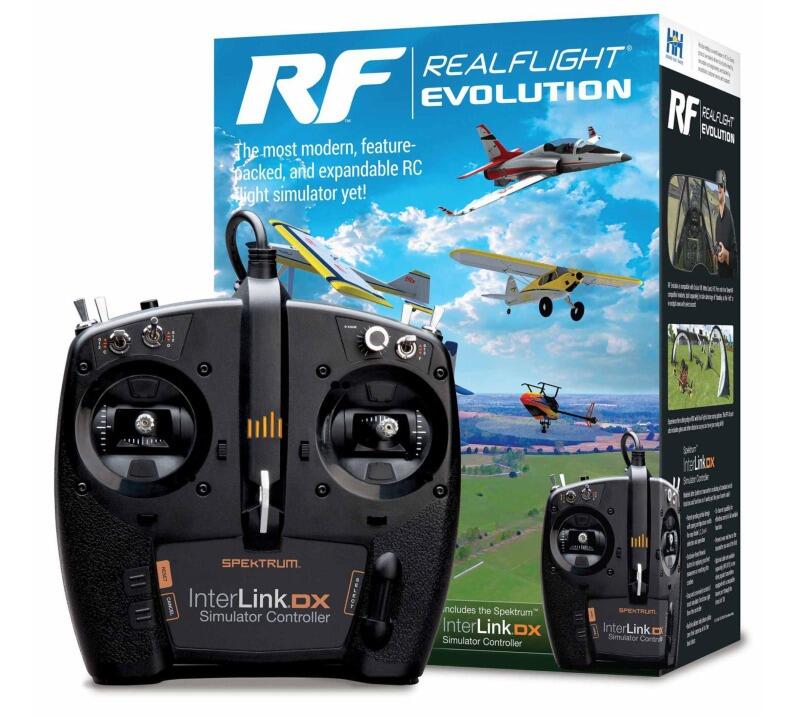
RealFlight Evolution "evolves" the world's most popular RC flight sim with a modern user interface while adding dozens of fields and more than 100 additional aircraft models. It also gives you access to new models and fields that are released quarterly!
Key Features
A fresh and modern user interface that's even easier and more intuitive to use, virtually eliminating the need to use a mouse or keyboard with the InterLink DX controller
More than a dozen of the newest and most popular ultra micro, sport, scale, EDF and trainer aircraft from E-flite, HobbyZone and Hangar 9 plus multiple helicopters from Blade
Fly at the newest PhotoField - the main flying site from Triple Tree Aerodrome, home of the world-famous "Joe Nall" and other events
More than 100 additional aircraft plus dozens of 3D fields and PhotoFields previously only available separately via Expansion Packs
Access to new models and fields released quarterly (starting in early 2023) for purchase à la carte, in money-saving content packs, or with yearly season passes
In The Box
(1) Spektrum™ InterLink® DX Simulator Controller
(1) RealFlight Evolution Steam® Code (on card)
(1) RealFlight Evolution Installation Guide
Needed to Complete
Compatible PC laptop or desktop with Windows® 8, Windows 10 or Windows 11
Internet connection to download the Steam® Client and RealFlight Evolution software
For more than two decades, RealFlight® has been the #1 RC flight simulator in the world! It's the absolute best tool new RC pilots can use when learning how to fly. It also makes it possible for experienced RC pilots to practice new maneuvers and hone their skills so they can become even better pilots. Plus, it's the best way to "try" new Horizon Hobby and other models before you buy them!
With more than 300 different aircraft to fly — including airplanes, helicopters, drones, and more — at over 75 different flying sites, plus the ability to edit and add aircraft and sites, there's an almost infinite number of flying options available. Add in Virtual Flight Instructor lessons, game-like challenges, multiplayer options so you can fly and compete with other pilots online, compatibility with VR headsets, and many, many more features, and you have everything you need to succeed at the field — because you can "fly" on a desktop at home, or on a laptop just about anywhere else!
Spektrum InterLink DX Simulator Controller Features
Modelled after Spektrum transmitters including all standard switch locations and functions so it works just like your favourite radio
Patent-pending gimbal design with spring configuration switch for easy Mode 1, 2, 3, or 4 selection and operation
Exclusive Reset/Rewind button for replaying your best maneuvers or resetting after crashes
Easy and convenient control of most simulator functions right from the controller
Built-in sliders help drone pilots zero their cameras in for the best shots
15-channel capability for effortless control of all available functions
Prevents wear and tear on your field transmitter
Optional adapter cord/cable set available separately to use other popular transmitters equipped with a compatible trainer port through the InterLink DX
Minimum Recommended System*
Windows® 7 or Windows 8 or Windows 10**
Intel® Pentium® 1.0GHz or equivalent
512 MB RAM
10 GB Hard Drive Space
DVD Drive
3D Accelerated Video with:
32 MB Dedicated Video Memory
Fully DirectX® 9 compliant (Shader Model 2.0 or better)
Spektrum® InterLink® DX Simulator Controller, a Spektrum wireless simulator dongle plus a compatible DSM2/DSMX equipped transmitter, a RealFlight® compatible controller, or other compatible Gamepad/Joystick
Online Activation Required
Internet connectivity required for activation** and to download additional content and updates